
There’s a specific kind of annoyance that comes from realizing you need a passport photo on a Sunday afternoon, when the pharmacy photo counter closes early and the post office isn’t open at all. Getting a passport photo online solves that timing problem directly, since the whole process happens from a phone or laptop, any hour of the day.
What Changed to Make This Possible
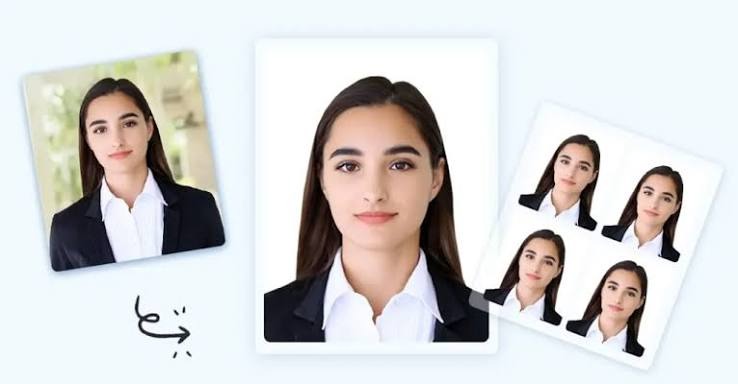
A passport photo generator works by separating two jobs that used to require a physical studio: taking the picture, and formatting it correctly. You still need a decent selfie, but you no longer need a plain wall, studio lighting, or a photographer who knows the exact head size percentage your government demands.
The software handles that second job. It removes whatever background is behind you in the original photo and replaces it with the required plain backdrop. Then it measures and crops your head to match the target proportion, whether that’s the 50 to 69 percent required for a US passport or the 64 to 76 percent required for a UK one.
Why the Old Way Still Trips People Up
Photo booths and pharmacy counters aren’t going anywhere, and for a lot of people they still work fine. But the failure rate on those photos is higher than most people expect. A slightly tilted head, a shadow falling across one side of the face, or a background that photographs as off white instead of true white can all be enough for a passport office to reject the image.
What’s frustrating is that these issues are often invisible to the person taking the photo. You look at the printout and it looks fine. It’s only when the passport office runs it against the exact spec that a problem shows up, and by then you’ve already lost the appointment slot or mailed the application.
Seeing the Result Before You Commit
This is the part that makes getting a passport photo online genuinely different from the old process. ReadyVisaPhoto lets you upload a selfie, see the finished, background removed, correctly sized photo for free, and only charges $16.99 once you’ve confirmed it’s the one you want to use. There’s no upfront payment for a photo you haven’t seen yet.
Say you’re applying for a Schengen visa and need a 35×45 mm photo with your head filling 70 to 80 percent of the frame. Uploading a normal phone photo and previewing the cropped, resized result first means you catch a problem, like a head that’s slightly undersized, before it becomes a rejected application months later.
What a Good Generator Covers
A passport photo generator built for real world use should span more than one document type, because most people dealing with passports and visas need more than one photo across their lifetime. Here’s a look at the range that matters:
- Passports: United States, United Kingdom, Australia
- Visas: US DS-160, Schengen, China visa
- ID documents: OCI card, DV Lottery entry
Each format carries its own pixel dimensions, file size caps, and head size percentages pulled from the relevant government’s official photo page, not a generic template applied across the board.
A Quick Real World Example
Picture a family preparing passport renewals for two kids before a summer trip. Instead of scheduling two separate pharmacy visits, a parent can photograph each child at home, upload both selfies, and generate two US passport photos online, checking each one against the 600×600 pixel, head 50 to 69 percent standard before paying anything.
That kind of flexibility, doing it at home on your own schedule, is really the whole appeal of moving this process online in the first place.
Does Getting It Online Sacrifice Accuracy?
Honestly, no, and that’s the part that surprises people the first time they try it. Because the tool measures against the actual published spec rather than a rough visual guess, the accuracy tends to be more consistent than a rushed photo booth session. The refund policy backs that up too. If a portal still rejects a photo, the amount is refunded within 30 days of purchase without needing proof of the rejection.
Getting Started
If a passport or visa deadline is coming up, getting the photo online is usually the faster and less stressful route. Upload a selfie, preview the generated photo for free, and only pay once it matches what the application actually needs. It’s a small shift from the old process, but it removes almost all the guesswork.
FAQ
Is a passport photo generated online accepted by government portals? Yes, provided it’s built to the exact published spec for that document, including pixel size, background, and head proportion. The photo file itself works the same as one from a print shop.
Do I need a plain background to start? No. The generator removes your existing background digitally and replaces it with the plain background the application requires, so any starting photo works.
How fast is the process from selfie to finished file? Most services complete the crop, resize, and background swap within moments of upload, letting you preview and download the same day you apply.